


Hey there! As a supplier of mag flow meters, I often get asked about how to upgrade the software of these nifty devices. Mag flow meters are super useful for measuring the flow rate of conductive liquids in various industries, from water treatment to chemical processing. And just like your smartphone or computer, keeping the software of your mag flow meter up - to - date is crucial for optimal performance and accuracy.
Why Upgrade the Software of a Mag Flow Meter?
Before we dive into the how - to, let's talk about why you should bother upgrading the software in the first place. Software upgrades can bring a bunch of benefits. Firstly, they can improve the accuracy of the flow measurement. New algorithms and calibration techniques are often included in software updates, which means you'll get more precise readings of how much liquid is flowing through your pipes.
Secondly, upgrades can enhance the functionality of the mag flow meter. You might get access to new features like advanced data logging, remote monitoring capabilities, or better integration with other systems in your plant. This can make your operations more efficient and easier to manage.
Lastly, software upgrades can also improve the security of your mag flow meter. Just like any connected device, mag flow meters can be vulnerable to cyber threats. Updating the software helps patch any security loopholes and keeps your data and operations safe.
Prerequisites for Software Upgrade
Before you start upgrading the software of your mag flow meter, there are a few things you need to do. First, make sure you have the right version of the software. You can usually find this information on the manufacturer's website. As a supplier, we always provide the latest software versions for our customers on our platforms.
You'll also need to gather the necessary tools. This might include a USB cable, a computer with the appropriate software installation files, and a power source for your mag flow meter. It's a good idea to check the compatibility of your computer's operating system with the software upgrade.
Another important thing is to back up all the existing data on your mag flow meter. This includes any calibration settings, historical flow data, or custom configurations. Losing this data during the upgrade process can be a real headache, so it's better to be safe than sorry.
Steps to Upgrade the Software
Let's get into the nitty - gritty of the upgrade process.
Step 1: Preparation
As mentioned earlier, make sure your mag flow meter is powered on and connected to a stable power source. You don't want the power to cut out during the upgrade, as this could damage the device. Also, ensure that the environment around the mag flow meter is clean and free from any electrical interference.
Step 2: Download the Software
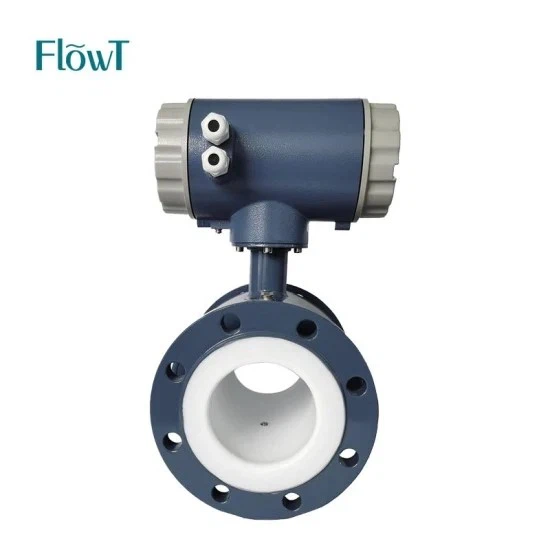
Head over to the manufacturer's website. In our case, if you're using our mag flow meters, you can find the latest software versions there. For example, if you're interested in our China Factory Promotions DN4 - DN2000mm Electromagnetic Flowmeter China Factory Promotions DN4 - DN2000mm Electromagnetic Flowmeter, the relevant software can often be found alongside product details.
Download the software onto your computer. Make sure you save it in a location where you can easily find it later, like your desktop or a dedicated downloads folder.
Step 3: Connect the Mag Flow Meter to the Computer
Use the USB cable to connect your mag flow meter to the computer. The connection should be secure. Once connected, your computer might detect the device automatically. If not, you may need to install the appropriate drivers. These drivers are usually provided along with the software download.
Step 4: Launch the Upgrade Program
Open the software upgrade program on your computer. Follow the on - screen instructions carefully. The program will usually detect your mag flow meter and display the current software version. It will also show the available upgrade version.

Step 5: Perform the Upgrade
Click on the "Upgrade" button in the software upgrade program. The process might take a few minutes to complete, depending on the size of the upgrade and the speed of your connection. Do not disconnect the mag flow meter or turn off the computer during this time.
Step 6: Verification
Once the upgrade is complete, the software will usually verify the installation. This step ensures that the new software has been installed correctly. You may also want to run some basic tests on your mag flow meter to check if it's working properly. For example, you can measure the flow rate of a known quantity of liquid and compare the results with the expected values.
Troubleshooting
Sometimes, things don't go as smoothly as we'd like during the upgrade process. Here are some common issues and how to fix them.
Connection Problems
If your computer doesn't detect the mag flow meter, check the USB cable. Make sure it's properly plugged in at both ends. You can also try using a different USB port on your computer. If the problem persists, there might be an issue with the drivers. Try reinstalling them from the manufacturer's website.
Upgrade Errors
If you encounter an error during the upgrade process, check the error message. It might provide some clues about what's going wrong. You can also refer to the manufacturer's troubleshooting guide. In most cases, the error could be due to a corrupt software download. Try downloading the software again and repeat the upgrade process.
Compatibility Issues
Sometimes, the new software might not be compatible with your mag flow meter's hardware. This could happen if you have an older model. In this case, contact the manufacturer's support team. They can advise you on whether an upgrade is possible or if you need to consider replacing your mag flow meter.
Conclusion
Upgrading the software of your mag flow meter is an important task that can bring many benefits. It's not overly complicated if you follow the steps carefully and take the necessary precautions. As a supplier, we're always here to help you with any software upgrade questions or issues you might have.
If you're in the market for a new mag flow meter or looking to upgrade your existing one, we have a great range of products. Check out our Mag Meter for Liquid High Accuracy Insertion Flow Meter Easy to Installation or our Insertion Flow Meter manufacturer page for more information. We offer high - quality products with the latest software features to meet your needs.
If you're interested in purchasing or want to discuss more about mag flow meters and their software upgrades, feel free to reach out to us. We're happy to have a chat and help you find the best solution for your business.
References
- Manufacturer's user manuals and guides for mag flow meters.
- Industry standards and best practices for software upgrades in industrial devices.


