


Hey there! As a supplier of transmitters, I've seen firsthand how crucial stability is in these devices. A stable transmitter ensures accurate data transmission, reduces downtime, and ultimately saves you a ton of headaches. So, in this blog post, I'm going to share some tips on how to improve the stability of a transmitter.

1. Choose the Right Transmitter for Your Application
The first step in improving transmitter stability is to select the right one for your specific application. There are different types of transmitters available, each designed for specific purposes. For example, if you're dealing with liquid measurement, you might want to consider an Industrial Pressure Transmitter for Liquid Measurement Smart Type Flow Meter. This type of transmitter is specifically designed to handle the unique challenges of measuring liquids, such as viscosity and density variations.
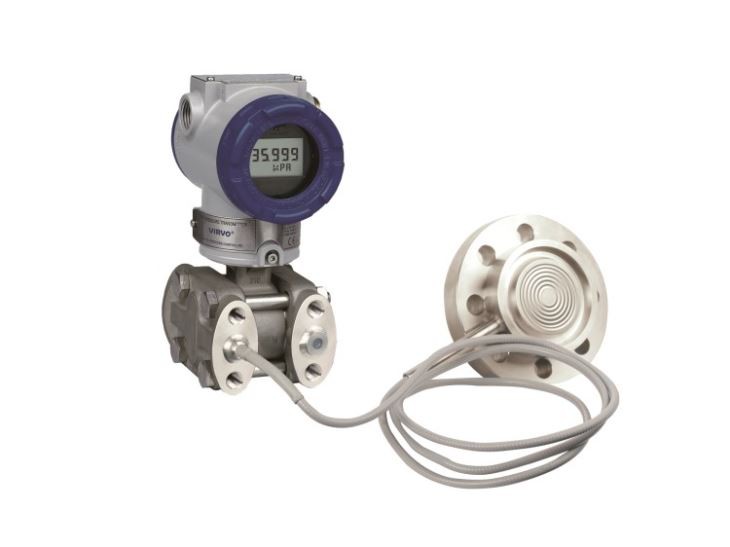
On the other hand, if you need to measure the difference in pressure between two points, a Differential Pressure Transmitter with Single or Double Flanges Flow Meter would be a better choice. These transmitters are highly accurate and can provide reliable measurements in a variety of industrial settings.
2. Proper Installation
Once you've selected the right transmitter, proper installation is key to ensuring its stability. Here are some installation tips to keep in mind:
- Mounting Location: Choose a mounting location that is free from vibrations, excessive heat, and electromagnetic interference. Vibrations can cause the transmitter to produce inaccurate readings, while heat can affect its performance. Electromagnetic interference can also disrupt the signal transmission.
- Level Installation: Make sure the transmitter is installed level. An uneven installation can cause the sensor to produce inaccurate readings, especially in applications where the measurement is affected by gravity.
- Proper Wiring: Use high-quality cables and wiring to connect the transmitter to the control system. Loose connections or damaged cables can cause signal loss or interference, leading to unstable readings.
3. Regular Calibration
Calibration is an essential part of maintaining the stability of a transmitter. Over time, the performance of a transmitter can drift due to factors such as temperature changes, wear and tear, and environmental conditions. Regular calibration ensures that the transmitter is providing accurate readings and helps to identify any potential issues before they become major problems.
The frequency of calibration depends on the type of transmitter and its application. In general, it's recommended to calibrate transmitters at least once a year. However, in some critical applications, more frequent calibration may be required.
4. Temperature Compensation
Temperature can have a significant impact on the stability of a transmitter. Most transmitters are designed to operate within a specific temperature range, and deviations from this range can cause the sensor to produce inaccurate readings. To minimize the effects of temperature on the transmitter, it's important to implement temperature compensation.
There are several ways to achieve temperature compensation, including:
- Built-in Temperature Sensors: Some transmitters come with built-in temperature sensors that can automatically adjust the output based on the temperature.
- External Temperature Sensors: In some cases, an external temperature sensor can be used to measure the ambient temperature and provide feedback to the transmitter for compensation.
- Thermal Insulation: Insulating the transmitter can help to reduce the effects of temperature changes on its performance.
5. Protection from Environmental Factors
Transmitters are often exposed to harsh environmental conditions, such as dust, moisture, and chemicals. These factors can damage the transmitter and affect its stability. To protect the transmitter from environmental factors, it's important to choose a transmitter that is designed for the specific environment in which it will be used.
In addition to choosing the right transmitter, you can also take the following steps to protect it:
- Use Enclosures: Install the transmitter in a protective enclosure to shield it from dust, moisture, and chemicals.
- Seal the Connections: Make sure all the connections are properly sealed to prevent moisture and dust from entering the transmitter.
- Regular Maintenance: Perform regular maintenance on the transmitter to check for any signs of damage or wear and tear.
6. Power Supply Stability
A stable power supply is essential for the proper operation of a transmitter. Fluctuations in the power supply can cause the transmitter to produce inaccurate readings or even malfunction. To ensure power supply stability, it's important to:
- Use a Regulated Power Supply: A regulated power supply can help to maintain a constant voltage and prevent fluctuations in the power supply.
- Avoid Power Surges: Power surges can damage the transmitter and cause it to malfunction. Use surge protectors to protect the transmitter from power surges.
- Check the Power Supply Regularly: Regularly check the power supply to ensure that it is providing the correct voltage and that there are no signs of damage or wear and tear.
7. Software and Firmware Updates
Manufacturers often release software and firmware updates for their transmitters to improve performance, add new features, and fix bugs. Keeping your transmitter's software and firmware up to date can help to improve its stability and ensure that it is operating at its best.
To update the software and firmware of your transmitter, follow the manufacturer's instructions carefully. Make sure to back up any important data before performing the update, and test the transmitter after the update to ensure that it is working properly.
8. Monitoring and Troubleshooting
Regular monitoring of the transmitter's performance can help to identify any potential issues before they become major problems. You can monitor the transmitter's output using a data logger or a control system. If you notice any abnormal readings or fluctuations in the output, it's important to troubleshoot the issue immediately.
Here are some troubleshooting tips to help you identify and fix common transmitter problems:
- Check the Connections: Loose connections or damaged cables can cause signal loss or interference, leading to unstable readings. Check all the connections to make sure they are tight and secure.
- Inspect the Sensor: The sensor is the most critical component of the transmitter. Inspect the sensor for any signs of damage or wear and tear. If the sensor is damaged, it may need to be replaced.
- Verify the Calibration: If the transmitter is producing inaccurate readings, it may need to be calibrated. Verify the calibration of the transmitter using a calibration device.
- Check the Power Supply: A stable power supply is essential for the proper operation of the transmitter. Check the power supply to make sure it is providing the correct voltage and that there are no signs of damage or wear and tear.
Conclusion
Improving the stability of a transmitter is essential for ensuring accurate data transmission, reducing downtime, and saving you money in the long run. By following the tips outlined in this blog post, you can choose the right transmitter for your application, install it properly, calibrate it regularly, protect it from environmental factors, ensure power supply stability, keep its software and firmware up to date, and monitor and troubleshoot its performance.
If you're in the market for a high-quality transmitter, or if you have any questions about improving the stability of your existing transmitter, please don't hesitate to contact us. We're here to help you find the right solution for your needs and ensure that your transmitter is operating at its best.
References
- "Instrumentation and Control Engineering Handbook", Third Edition, edited by Myke King
- "Process Measurement and Instrumentation", Second Edition, by John G. Webster


