


Hey there! As a pressure transmitter supplier, I often get asked about how to connect a pressure transmitter to a PLC (Programmable Logic Controller). It's a crucial process that can seem a bit daunting at first, but with the right guidance, it becomes a whole lot easier. In this blog, I'll walk you through the steps and share some tips to make the connection smooth and hassle - free.
First off, let's understand what a pressure transmitter and a PLC are. A pressure transmitter is a device that measures pressure and converts it into an electrical signal. On the other hand, a PLC is a digital computer used for automation of industrial processes. Connecting them allows you to monitor and control pressure in various industrial applications.
Step 1: Choose the Right Pressure Transmitter
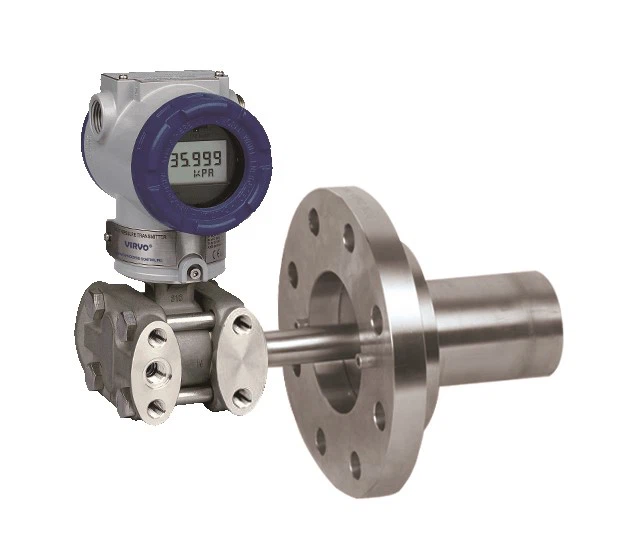
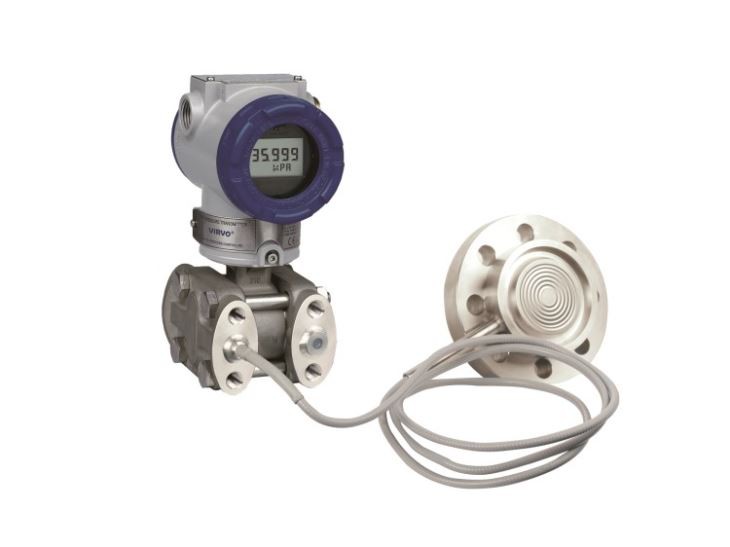
Before you start the connection process, you need to select the appropriate pressure transmitter for your application. We offer a wide range of transmitters, like the Differential Pressure Transmitter with Single or Double Flanges Flow Meter. This transmitter is great for applications where you need to measure the difference in pressure between two points.
Another option is the Industrial Pressure Transmitter for Liquid Measurement Smart Type Flow Meter. It's designed specifically for measuring the pressure of liquids and comes with smart features that make it easy to integrate with a PLC. And if you're dealing with water measurement, the Pressure Transmitter with Hart Protocol for Water Measurement is a top - notch choice. The HART protocol allows for digital communication between the transmitter and the PLC, providing more accurate and detailed data.
Step 2: Gather the Necessary Tools
Once you've chosen the right pressure transmitter, it's time to gather the tools you'll need for the connection. You'll typically need a screwdriver for opening the transmitter and PLC enclosures, wire strippers to prepare the wires, and a multimeter to test the electrical signals. Make sure you have all these tools handy before you start.
Step 3: Mount the Pressure Transmitter
Proper mounting of the pressure transmitter is essential for accurate pressure measurement. Follow the manufacturer's instructions to mount the transmitter in the right location. It should be installed in a place where it can easily sense the pressure you want to measure, and it should be protected from any physical damage or environmental factors that could affect its performance.
Step 4: Connect the Wires
Now comes the actual connection part. The pressure transmitter usually has output wires that carry the electrical signal representing the measured pressure. These wires need to be connected to the input terminals of the PLC.
First, identify the output wires of the pressure transmitter. Most transmitters have a positive and a negative wire for the output signal. Use the wire strippers to remove a small portion of the insulation from the ends of these wires.
Next, locate the input terminals on the PLC. These terminals are usually labeled clearly. Connect the positive output wire of the pressure transmitter to the positive input terminal of the PLC, and the negative output wire to the negative input terminal. Make sure the connections are tight and secure to avoid any loose connections that could cause signal loss or interference.
Step 5: Configure the PLC
After the physical connection is done, you need to configure the PLC to recognize the input from the pressure transmitter. This involves setting up the input module of the PLC to accept the type of signal (e.g., 4 - 20 mA or 0 - 10 V) that the pressure transmitter is outputting.
Access the programming software of the PLC and navigate to the input module configuration section. Set the appropriate signal type and range according to the specifications of your pressure transmitter. You may also need to set up scaling and calibration parameters to ensure accurate pressure readings on the PLC.
Step 6: Test the Connection
Once you've configured the PLC, it's time to test the connection. Use the multimeter to check if the electrical signal from the pressure transmitter is reaching the PLC correctly. Apply some pressure to the transmitter and observe the changes in the signal on the multimeter.
Also, check the PLC display or programming software to see if the pressure readings are being updated correctly. If there are any issues, double - check the wire connections, the PLC configuration, and the mounting of the pressure transmitter.
Tips for a Successful Connection
- Use Shielded Cables: To reduce electrical interference, use shielded cables for connecting the pressure transmitter to the PLC. This will help ensure a stable and accurate signal.
- Follow Safety Procedures: When working with electrical components, always follow safety procedures. Turn off the power before making any connections, and wear appropriate safety gear.
- Keep Documentation Handy: Keep the user manuals of both the pressure transmitter and the PLC handy. They contain valuable information that can help you troubleshoot any issues that may arise during the connection process.
Conclusion
Connecting a pressure transmitter to a PLC is not as complicated as it may seem. By following the steps outlined in this blog and using the right tools and techniques, you can make a successful connection. And as a pressure transmitter supplier, we're here to support you every step of the way.
If you're interested in purchasing a pressure transmitter for your application or need more information about the connection process, don't hesitate to reach out. We're always happy to help you find the best solution for your needs.
References
- Manufacturer's user manuals for pressure transmitters and PLCs.
- Industry standards for electrical connections in industrial automation.


